
06 — The Yavi Theme backend module
Everything a site can configure without touching TypoScript lives in one module, below Site Management in the module menu. It is admin-only.
Yavi Theme
├── Design / Colors    brand colours, status colours, gradients        27 fields
├── Layout             logo, spacing, container sizes, typography      37 fields, 7 tabs
├── Navigation         variant, behaviour, sizes, language, search     13 fields, 4 tabs
├── Custom CSS         the CSS classes editors may pick per element     1 field
├── Config             site, contact, social, tracking                 20 fields, 4 tabs
├── Go-Live Check      the classic launch mistakes, checked            no settings
└── Licence            key and status                                   2 fields
Every logo field is on the Layout page, in the Logo tab — including the two mobile heights and the height the logo shrinks to when the header does. They used to be spread over Layout and Config, which meant a logo change could take three visits to two pages.
The whole of the navigation has its own page. Before, it was two tabs that were both called Navigation, one under Layout and one under Config, and they steered each other: the switch that lets the header shrink lived on one page, the height it shrinks to on the other.
How it works
Every page shows the settings of its own category and writes them to config/sites/<id>/settings.yaml. Three properties are worth knowing because they explain most of the behaviour:
1. Saving is scoped to the page. The Layout page can only ever write Layout settings. A key from another page, smuggled into the request, is rejected. One page can therefore never wipe another page's values.
2. Empty means "inherit", not "nothing". Saving a field that equals the default removes the key from settings.yaml instead of storing it. Otherwise a stored value would win over the theme's Set forever, and a theme switch would have no effect on every field anyone had ever touched.
3. Saving flushes the page cache. Changes take effect immediately, not at the next natural cache expiry.
Reading the form
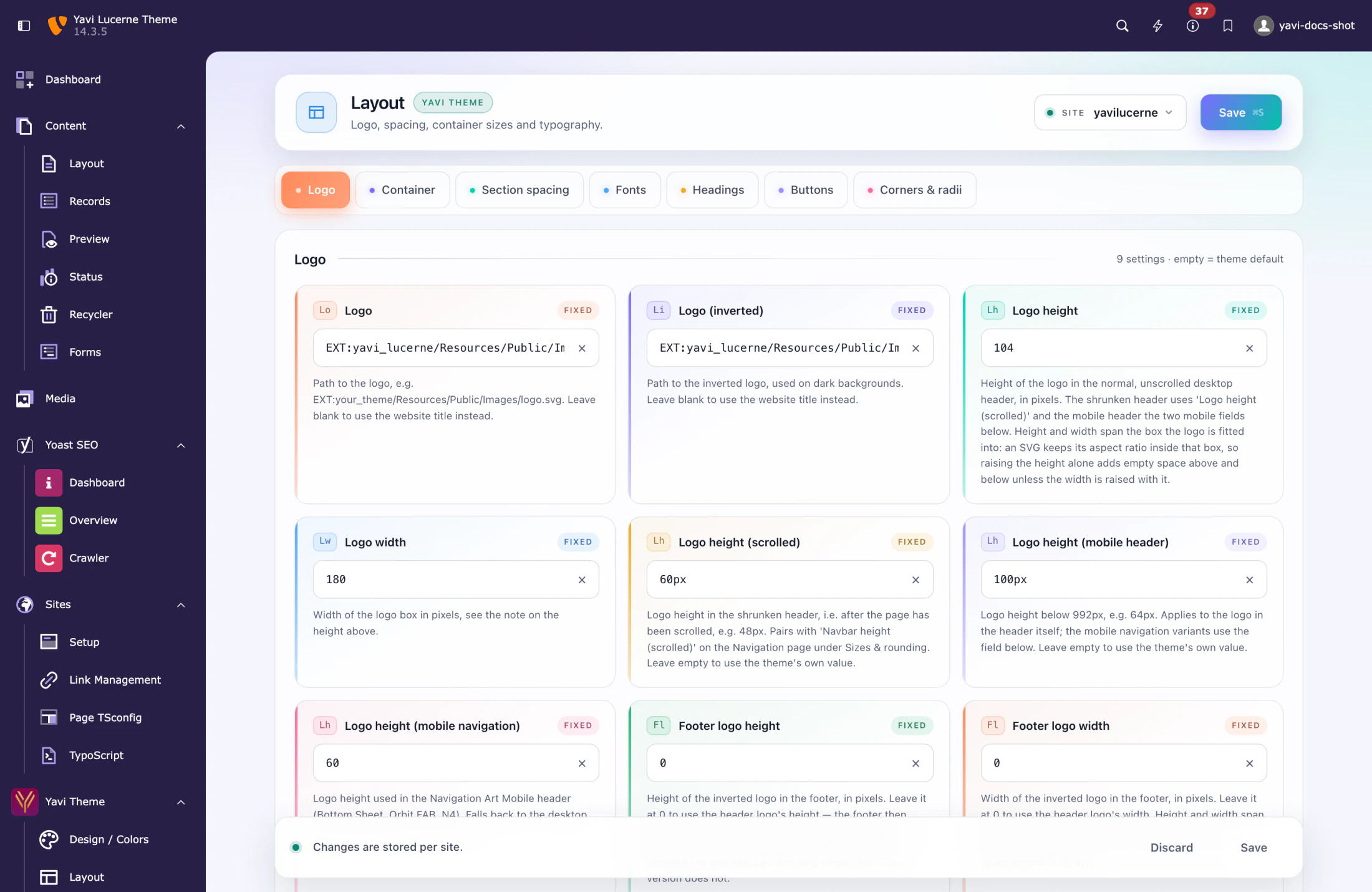
Every field carries three hints:
| Element | Meaning |
|---|---|
| The coloured rail on the left | Groups the fields visually; the colour cycles, it has no meaning of its own. |
The token (H1, XS, Hf) | Short label of the field — the heading level or size step it belongs to. |
| The badge | theme = empty, so the theme's value applies · fixed = a fixed value is set · fluid = the value uses clamp() |
The site selector at the top right switches between sites when the installation has more than one. The save bar at the bottom appears as soon as something changes; ⌘S / Ctrl+S saves.
The pages
| Page | Chapter |
|---|---|
| Design / Colors | 07 — Design / Colors |
| Layout | 08 — Layout |
| Navigation | 08b — The Navigation page |
| Custom CSS | 10 — Custom CSS classes |
| Config | 09 — Config |
| Licence | 11 — Licence |
A field-by-field table of all 100 settings is in the settings reference.
What the module does not do
- It does not edit TypoScript. Anything not offered here belongs in the theme (layer 2/3), not in a site setting.
- It does not touch content. Colours per element, per-element spacing and per element CSS classes are properties of the content element, not of the site.
- It does not upload files. The logo fields take a path —
fileadmin/…orEXT:…— to a file you have already put there.
Where the values end up
# config/sites/<id>/settings.yaml — written by the module
plugin.bootstrap_package.settings.scss.primary: '#0D2A5C'
page.theme.cssvar.navbarHeight: 125px
page.theme.cssvar.cardRadius: 12px
licence.key: 'XXXX-XXXX-XXXX'
licence.product: yavi-lucerne
Two kinds of key appear here:
| Prefix | Goes to |
|---|---|
plugin.bootstrap_package.settings.scss.* | Bootstrap Package's SCSS variables — these are compiled into the stylesheet. |
page.theme.cssvar.* | CSS custom properties, emitted into the page head at render time. |
The difference matters in practice: a change to an SCSS variable needs a cache flush to recompile, a change to a custom property takes effect on the next page load.